
EstimationOS · Your agency, your expertise
Property valuation under your agency’s brand
Explore the market, assess a property and give your client a professional report carrying your agency’s identity. EstimationOS brings sale references, your professional judgement and conclusions into a record you can revisit and update.
Everyday work
“Why is my apartment worth this amount?”
An owner needs more than a number. They need to understand the references, the property’s characteristics and your recommendation. Prepare a documented valuation and a report under your own brand.
From the property to an explained valuation.
A clearly identified property
Before the price,
the right information.
- Property type
- Apartment
- Habitable area
- 68 m²
- Property condition
- To confirm during the visit
Known information is recorded. Missing information stays visible.
References to examine
The market becomes
a basis for discussion.
- 01A sale near the propertyDate · floor area · observed price
- 02A property of comparable sizeDate · floor area · observed price
- 03A reference to verifyDate · floor area · observed price
Review references and explain relevant exclusions.
One analysis.
Your recommendation.
Property · Market · Comparables
Calculation · Adjustments · Conclusion
Your brand, your client relationship
A document to deliver.
A judgement to explain.
- Your agency’s identity
- References and reasons behind the result
- A retained published version
Review the preview before publication, then export or share the report.
Fictional workflow presentation. Illustrations are not product screenshots or an actual valuation.
01The propertyConfirm what you are assessing.
Check the address, floor area and known characteristics.
A two-bedroom apartment, 68 m². Condition and features to verify during the visit.
Unknown information stays unknown; the address must be confirmed.
02The marketReview relevant sale references.
Examine recorded transactions and selected comparables.
Location, sale date, property type, floor area and price support the comparison.
Record the reason when excluding an unsuitable reference.
03Your conclusionExplain your recommendation.
Review the calculation and record professional adjustments before publishing.
The report presents the property, the references, the calculation and points to verify.
A published report remains distinct from later work on the record.
Fictional example, not a product screenshot. Sources and access require configuration; illustrated answers use the information shown.
Your judgement becomes a record your client can understand.
The calculation supplies a documented basis. You supply local knowledge and justified adjustments. The report keeps observed facts separate from professional judgement.
Explore AlefOS for real estateOn this page
- Value, explain and follow up
- Start with a confirmed property
- Explore the market before quoting a value
- Understand the selected comparables
- A calculated result with explicit limitations
- Keep professional judgement visible
- Rental and investment scenarios
- Read the sources in context
- An eight-page report under your brand
- Revisit records and their versions
- Share a report, not your entire workspace
- Use the WebApp or a connected assistant
- A distinct role in your real estate environment
- An accompanied rollout for your agency
- Frequently asked questions
Value, explain and follow up
EstimationOS supports residential property valuation in France. Identify the property, explore its market and prepare a documented opinion of value.
The record brings together property information, selected references, calculations, adjustments and conclusions. Apartments and houses are the described scope; unusual or complex properties require specialist review.
Start with a confirmed property
Find an address and confirm the proposed location. Enter the property type, habitable floor area and known features.
Missing floor area is not treated as zero. An unverified feature stays unconfirmed. An energy certificate found nearby is not automatically the certificate for this dwelling.
Explore the market before quoting a value
The market explorer displays available recorded sales, their dates, floor areas, property categories and observed prices around an address or within an area.
DVF records completed transactions, not current listings. Data coverage and the displayed period matter. Partial results are labelled; visible markers do not necessarily represent the entire market.
Understand the selected comparables
Location, sale periods and available characteristics support the selection of comparable properties. The record retains the references used.
Review their relevance, include an eligible reference or exclude an unsuitable sale with a reason. The valuation uses an identified set of comparables, rather than an unexplained neighbourhood average.
A calculated result with explicit limitations
The calculation uses weighted prices per square metre from retained comparables. Their dispersion, age and the available coverage inform how the result should be read.
Too few, old or inconsistent sales, an imprecise location or missing essential fields can prevent a sufficiently supported result. The record shows what needs attention rather than inventing certainty.
Keep professional judgement visible
A verified property feature or your knowledge of a building can justify an adjustment. Record an amount or percentage correction through the supported workflow.
Its reason, author and contribution remain in the record. A descriptive feature does not automatically trigger an invented premium or discount.
Rental and investment scenarios
Where prepared, the record can include long-term rental analysis and investment scenarios. Rent, charges and financing assumptions help explore the project.
Results depend on entered parameters and available references. A rent assumption is not a rental commitment; an investment scenario is not a guaranteed return.
Read the sources in context
IGN geocoding supports address resolution; DVF supports observed sale references. Available energy certificates, risk information and rental references may enrich the analysis according to coverage and the workflow used.
Sources are not a complete inspection of the property. Dates, geographical coverage and verified inputs remain important. Collected data, professional confirmations and assumptions stay distinct.
An eight-page report under your brand
The PDF presents the property, market context, references, valuation, any prepared additional analysis and conclusions. Your agency identity appears on the report.
Review the preview before publishing. The exported PDF corresponds to the published version, even when later work continues on the record.
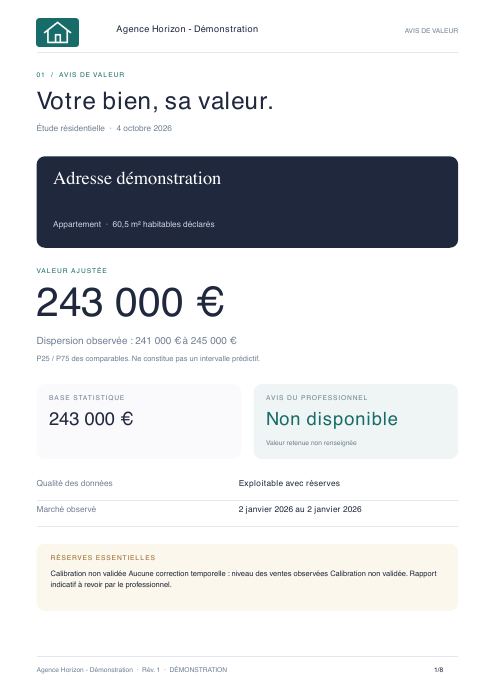
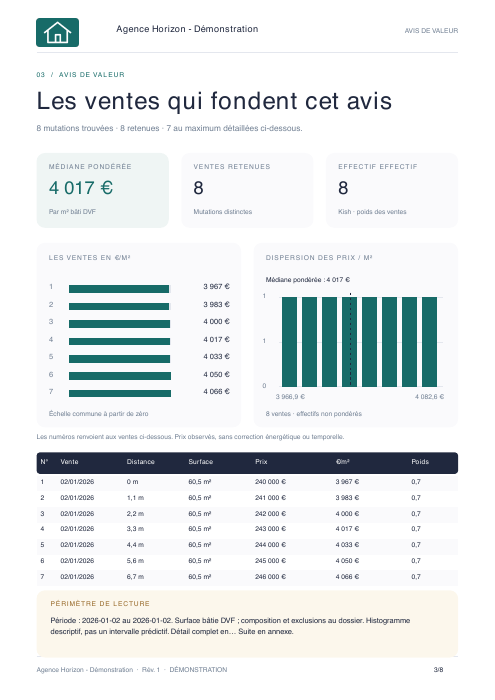
Excerpts from an actually generated demonstration report. Synthetic data, not a client valuation. Select a page to enlarge it.
Revisit records and their versions
The WebApp lists your valuation records and their state. Reopen an analysis, update the information and prepare a new version when circumstances change.
A new visit or updated floor area does not erase a previously delivered document. Published versions remain separate from work in progress.
Share a report, not your entire workspace
Export the PDF or create a report consultation link through the supported sharing workflow. Access concerns the authorised report, not every agency record.
Publication and sharing are distinct steps. Choose available access conditions, including validity. Treat a report link as access to a client document, not a publicly indexed page.
Use the WebApp or a connected assistant
Explore the market and prepare records in the WebApp. A compatible assistant connected to AlefOS can retrieve records or request authorised EstimationOS operations.
For example: “Prepare a valuation record for this address” or “Show the selected comparables”. Required information and confirmation steps still apply. The assistant’s wording does not replace the calculation or the professional’s review.
A distinct role in your real estate environment
EstimationOS assesses property value. ProductOS structures your catalogue. SalesOS prepares commercial proposals; SignOS supports document signing.
Deploy these complementary functions around your work. Adding EstimationOS does not automatically include every extension or workflow.
An accompanied rollout for your agency
Define the use cases, authorised people, report identity and information needed for your records. We configure the workflow and verify it with representative examples.
The professional can prepare and review the valuation; the owner receives a clear report; the agency retains its work. Further capabilities follow your agreed needs.
What each person receives
Scroll the table to read every column. With a keyboard, use the left and right arrow keys.
| In the workflow | What they receive | Why it helps |
|---|---|---|
| Professional | Confirmed property, comparables, calculation and adjustments | Build and explain an opinion of value. |
| Property owner | Published report under the agency’s brand | Understand the references and conclusion. |
| Agency | Saved records and retained versions | Revisit work and follow changes. |
Frequently asked questions
Is the final sale price guaranteed?
No. The valuation is a documented opinion based on available information. We do not promise a precision percentage that has not been measured.
Which properties are covered?
The described workflow covers apartments and houses in France. Unusual or complex properties require specialist review.
Does the report carry my agency’s brand?
Yes. Review the branded report preview before publishing and delivering the PDF.
What if the data is insufficient?
The record identifies limitations and missing information. Sparse references are not hidden behind a confident number.
How does this differ from SalesOS?
EstimationOS prepares a property valuation. SalesOS prepares a commercial proposal. They serve different stages of your work.
Continue exploring
EstimationOS joins your agency’s business capabilities in AlefOS. Understand your AI connection ↗